---
title: Catylex Knowledge Center
---
[](https://knowledge.catylex.com)
[Get Support](https://knowledge.catylex.com/support?hsLang=en)
# Catylex Knowledge Center
# A brief overview
### Dashboards

### Dashboards
When you log in, the first place you'll land is the **Overview Dashboard**.
This dashboard provides quick navigation options to other areas of the platform (*Upload Contracts* and *Search & Analyze*) and a high-level data overview for all contracts that have already been loaded and processed in the selected workspaces.
Use the toggle in the top right corner of the screen to switch to the **Data Confidence Dashboard**. This dashboard can help users determine where to focus their quality check (QC) efforts.
[FAQs on Dashboards](https://knowledge.catylex.com/faq#data-confidence)
#### Video: Overview Dashboard
#### Video: Data Confidence Dashboard
### Upload Contracts (including Rapid Assessment)

### Upload Contracts
- Contracts can be uploaded from the **Overview Dashboard** or by clicking the "Upload" (cloud) icon in the toolbar
- Catylex can process PDFs, txt, docx, and most image types (e.g., jpeg, gif). The platform cannot process zip files.
- Catylex has two processing modes: [Rapid Assessment](https://knowledge.catylex.com/faq#upload-contracts) (RA) and Full Processing. RA provides basic data quickly to allow for contract identification, deduplication. Full processing provides a richer and AI matched data set.
- Best practice is to limit file upload through the UI to 100 files at a time, Catylex supports significantly larger scale (approx. 1,000 contracts per hour) – contact your subscription manager or Catylex account manager for support
- On file upload, Catylex is checking for duplicate file names, to avoid inadvertently reloading files you may have loaded in a previous session .
### [Relevant FAQs](https://knowledge.catylex.com/faq?hsLang=en)
#### Video: How to Upload a Contract
### Cleaning & QC (Quality Check)

### Cleaning Documents & QC (Quality Check)
Managing large contract portfolios is one of the most challenging tasks facing legal operations teams. When dealing with tens of thousands of files, manual organization becomes nearly impossible to execute accurately and consistently.
Catylex transforms this traditionally manual process into automated, scalable operations. Our AI-powered features handle the heavy lifting, enabling teams to move from months of manual work to days of automated processing—with superior accuracy and completeness.
- **Deduplication:** identifying and removing duplicates
- **Split Document:** splitting files with more than one contract
- **Linking Contracts:** establishing relationships between related agreements
- **QC (Quality Checking):** removing non-contract documents and performing quality checks either by concept or by document and managing data confidence
By automating these foundational tasks legal operations managers can redirect their expertise toward higher-value strategic initiatives while ensuring contract analysis projects begin with clean, well-structured datasets that drive better business outcomes.
### Tags & Custom Content

### Tags & Custom Content
Users often ask if they have the ability to isolating or marking sentences or contracts. Catylex uses Tags and Custom Concepts to help users label results and subsequently use either in reporting or in further refined search.
- **Tagging capabilities** for marking relevant results at the sentence or contract level.
- **Auto-tagging functionality** that applies consistent classification to contracts loaded in the future, that meet specified conditions
- **Custom Content** is a series of functions that allow users to create new concepts to be used in either “Views” for analysis purposes or exporting relevant data for use outside of Catylex. Users can also create their own views, perhaps for a particular project that is focused on a subset of the contract provisions.
- [Video: How to Create Custom Concepts](https://knowledge.catylex.com/video-library#customconcepts10)
- [Video: How to Create Custom Views](https://knowledge.catylex.com/video-library#customviews11)
### Legal Entity Management

### Legal Entity Management
Effective contract management depends on maintaining accurate, consistent information about contracting parties. One of the most common challenges legal teams face is inconsistent entity naming across contracts—where "Main St Renewal LLC" might appear as "Main Street Renewal, Limited Liability Corporation" in different agreements.
**Catylex's Legal Entity Management** solves this by creating a centralized repository for all your contracting entities and counterparties. The system normalizes entity names, maintains historical information including name changes and DBAs, and provides comprehensive visibility into all contractual relationships regardless of naming variations.
Catylex transforms scattered entity data into a single source of truth for smarter contract analysis. This enables accurate reporting, enhanced risk assessment, and seamless integration with existing business systems—turning entity management from an administrative burden into a strategic asset.
### Search & Analyze
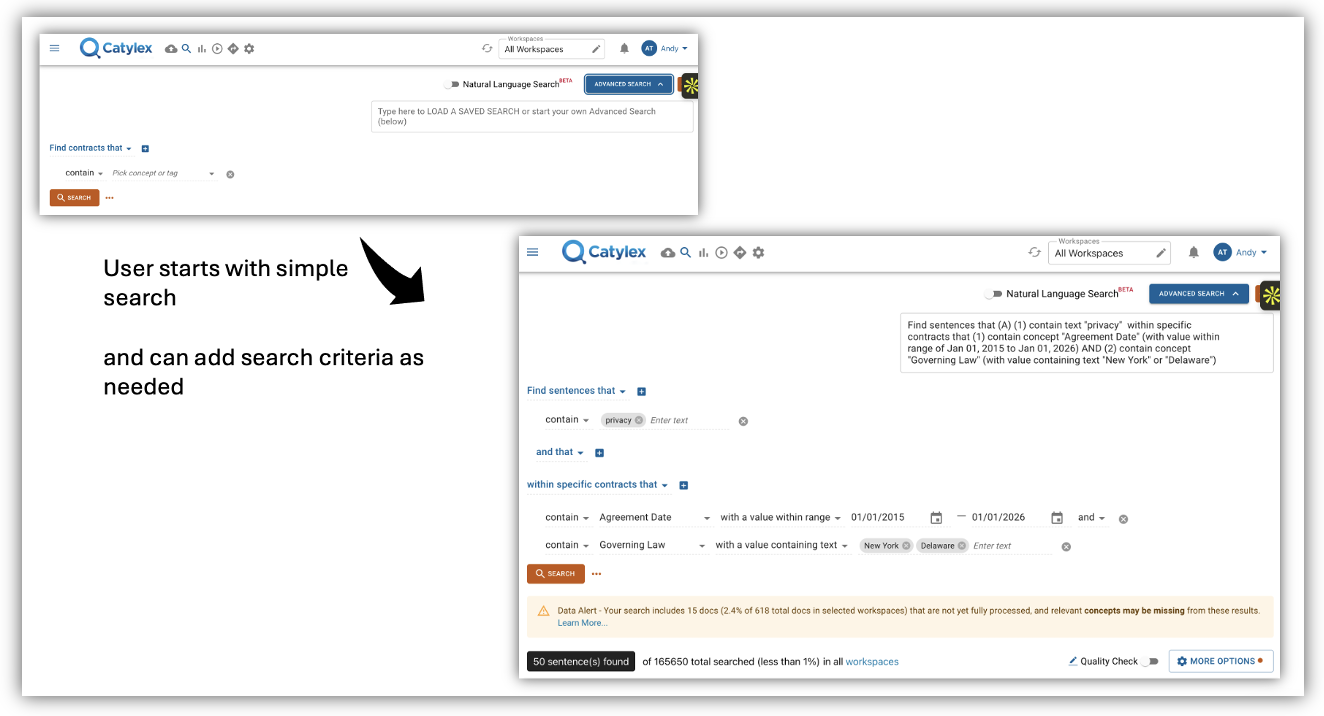
### Search & Analyze
Organizations maintain extensive contract portfolios where critical business information remains buried within lengthy documents. Traditional manual review processes are time-consuming, error-prone, and simply don't scale when dealing with thousands of contracts. Legal teams waste countless hours searching for specific provisions, conducting due diligence, or responding to compliance inquiries—time that could be spent on higher-value strategic work.
**Catylex's Search Filters**
Filter your contracts by Date, Title, Party and/or customize these filters to your specific needs for quick access to the contracts that you nee
**Catylex's Natural Language Search**
Use plain English queries to find the subset of relevant contracts for today's issue.
**Catylex's Advanced Contract Search** transforms contracts from static documents into queryable databases. Our platform combines simple filtering with sophisticated concept-based searching that recognizes semantic variations—finding "12 months," "1 year," and "52 weeks" with a single search. Boolean logic enables complex queries, while intelligent concept recognition accelerates searches without requiring users to anticipate every possible terminology variation.
This capability enables rapid due diligence, proactive risk management, and instant responses to business questions—freeing legal teams from manual document review while unlocking hidden value across entire contract portfolios.
[FAQs on Search](https://knowledge.catylex.com/faq#search)
[Video: Overview of Advanced Search](https://knowledge.catylex.com/video/advanced-search?hsLang=en)
### Share

### Export Excel
All contract data along with links that take users back to the contract in the Catylex platform, can be downloaded by the user as an XLSX file, or be sent via email to the email address associated with the user’s account.
### Service Accounts & APIs
Catylex also offers a number of APIs out of the box and partners with its clients to develop integration solutions.
Catylex can be connected to existing contract repositories, e.g. e-Signature solutions, CRMs or document management systems, and other enterprise systems that need contract data instead of manually rekeying data.
Contact your account manager for RESTful API documentation and a service account to test or leverage these APIs.
[See Short Video on exporting data](https://knowledge.catylex.com/video-library#exportdatavideo)
### Administration

### Administration
Organizations struggle with contract security and access control across diverse teams and sensitive agreements. Different departments need access to relevant contracts while maintaining strict confidentiality—HR shouldn't see sales agreements, regional teams need access only to their contracts, and executives require comprehensive oversight. Without proper access controls, organizations face compliance risks, data breaches, and inefficient workflows where teams can't find what they need or access what they shouldn't.
**Catylex's “Administration”** provides features to manage their account which includes managing users, what they can access as well as reporting. Administrators can easily create secure workspaces that limit contract access by department, region, or project—ensuring, for example, HR sees only employment agreements, while sales teams can only access their relevant customer contracts.
The platform includes robust user management, multi-factor authentication, and detailed activity logging for complete audit trails. With centralized control over organizational settings, usage limits, and AI matching configurations, administrators maintain security and compliance while enabling teams to work efficiently within their designated contract universes.
[FAQs on Administration](https://knowledge.catylex.com/faq#account-setup)

### Dashboards
When you log in, the first place you'll land is the **Overview Dashboard**.
This dashboard provides quick navigation options to other areas of the platform (*Upload Contracts* and *Search & Analyze*) and a high-level data overview for all contracts that have already been loaded and processed in the selected workspaces.
Use the toggle in the top right corner of the screen to switch to the **Data Confidence Dashboard**. This dashboard can help users determine where to focus their quality check (QC) efforts.
[FAQs on Dashboards](https://knowledge.catylex.com/faq#data-confidence)
#### Video: Overview Dashboard
#### Video: Data Confidence Dashboard

### Upload Contracts
- Contracts can be uploaded from the **Overview Dashboard** or by clicking the "Upload" (cloud) icon in the toolbar
- Catylex can process PDFs, txt, docx, and most image types (e.g., jpeg, gif). The platform cannot process zip files.
- Catylex has two processing modes: [Rapid Assessment](https://knowledge.catylex.com/faq#upload-contracts) (RA) and Full Processing. RA provides basic data quickly to allow for contract identification, deduplication. Full processing provides a richer and AI matched data set.
- Best practice is to limit file upload through the UI to 100 files at a time, Catylex supports significantly larger scale (approx. 1,000 contracts per hour) – contact your subscription manager or Catylex account manager for support
- On file upload, Catylex is checking for duplicate file names, to avoid inadvertently reloading files you may have loaded in a previous session .
### [Relevant FAQs](https://knowledge.catylex.com/faq?hsLang=en)
#### Video: How to Upload a Contract

### Cleaning Documents & QC (Quality Check)
Managing large contract portfolios is one of the most challenging tasks facing legal operations teams. When dealing with tens of thousands of files, manual organization becomes nearly impossible to execute accurately and consistently.
Catylex transforms this traditionally manual process into automated, scalable operations. Our AI-powered features handle the heavy lifting, enabling teams to move from months of manual work to days of automated processing—with superior accuracy and completeness.
- **Deduplication:** identifying and removing duplicates
- **Split Document:** splitting files with more than one contract
- **Linking Contracts:** establishing relationships between related agreements
- **QC (Quality Checking):** removing non-contract documents and performing quality checks either by concept or by document and managing data confidence
By automating these foundational tasks legal operations managers can redirect their expertise toward higher-value strategic initiatives while ensuring contract analysis projects begin with clean, well-structured datasets that drive better business outcomes.

### Tags & Custom Content
Users often ask if they have the ability to isolating or marking sentences or contracts. Catylex uses Tags and Custom Concepts to help users label results and subsequently use either in reporting or in further refined search.
- **Tagging capabilities** for marking relevant results at the sentence or contract level.
- **Auto-tagging functionality** that applies consistent classification to contracts loaded in the future, that meet specified conditions
- **Custom Content** is a series of functions that allow users to create new concepts to be used in either “Views” for analysis purposes or exporting relevant data for use outside of Catylex. Users can also create their own views, perhaps for a particular project that is focused on a subset of the contract provisions.
- [Video: How to Create Custom Concepts](https://knowledge.catylex.com/video-library#customconcepts10)
- [Video: How to Create Custom Views](https://knowledge.catylex.com/video-library#customviews11)

### Legal Entity Management
Effective contract management depends on maintaining accurate, consistent information about contracting parties. One of the most common challenges legal teams face is inconsistent entity naming across contracts—where "Main St Renewal LLC" might appear as "Main Street Renewal, Limited Liability Corporation" in different agreements.
**Catylex's Legal Entity Management** solves this by creating a centralized repository for all your contracting entities and counterparties. The system normalizes entity names, maintains historical information including name changes and DBAs, and provides comprehensive visibility into all contractual relationships regardless of naming variations.
Catylex transforms scattered entity data into a single source of truth for smarter contract analysis. This enables accurate reporting, enhanced risk assessment, and seamless integration with existing business systems—turning entity management from an administrative burden into a strategic asset.

### Search & Analyze
Organizations maintain extensive contract portfolios where critical business information remains buried within lengthy documents. Traditional manual review processes are time-consuming, error-prone, and simply don't scale when dealing with thousands of contracts. Legal teams waste countless hours searching for specific provisions, conducting due diligence, or responding to compliance inquiries—time that could be spent on higher-value strategic work.
**Catylex's Search Filters**
Filter your contracts by Date, Title, Party and/or customize these filters to your specific needs for quick access to the contracts that you nee
**Catylex's Natural Language Search**
Use plain English queries to find the subset of relevant contracts for today's issue.
**Catylex's Advanced Contract Search** transforms contracts from static documents into queryable databases. Our platform combines simple filtering with sophisticated concept-based searching that recognizes semantic variations—finding "12 months," "1 year," and "52 weeks" with a single search. Boolean logic enables complex queries, while intelligent concept recognition accelerates searches without requiring users to anticipate every possible terminology variation.
This capability enables rapid due diligence, proactive risk management, and instant responses to business questions—freeing legal teams from manual document review while unlocking hidden value across entire contract portfolios.
[FAQs on Search](https://knowledge.catylex.com/faq#search)
[Video: Overview of Advanced Search](https://knowledge.catylex.com/video/advanced-search?hsLang=en)

### Export Excel
All contract data along with links that take users back to the contract in the Catylex platform, can be downloaded by the user as an XLSX file, or be sent via email to the email address associated with the user’s account.
### Service Accounts & APIs
Catylex also offers a number of APIs out of the box and partners with its clients to develop integration solutions.
Catylex can be connected to existing contract repositories, e.g. e-Signature solutions, CRMs or document management systems, and other enterprise systems that need contract data instead of manually rekeying data.
Contact your account manager for RESTful API documentation and a service account to test or leverage these APIs.
[See Short Video on exporting data](https://knowledge.catylex.com/video-library#exportdatavideo)

### Administration
Organizations struggle with contract security and access control across diverse teams and sensitive agreements. Different departments need access to relevant contracts while maintaining strict confidentiality—HR shouldn't see sales agreements, regional teams need access only to their contracts, and executives require comprehensive oversight. Without proper access controls, organizations face compliance risks, data breaches, and inefficient workflows where teams can't find what they need or access what they shouldn't.
**Catylex's “Administration”** provides features to manage their account which includes managing users, what they can access as well as reporting. Administrators can easily create secure workspaces that limit contract access by department, region, or project—ensuring, for example, HR sees only employment agreements, while sales teams can only access their relevant customer contracts.
The platform includes robust user management, multi-factor authentication, and detailed activity logging for complete audit trails. With centralized control over organizational settings, usage limits, and AI matching configurations, administrators maintain security and compliance while enabling teams to work efficiently within their designated contract universes.
[FAQs on Administration](https://knowledge.catylex.com/faq#account-setup)
### What's New
### Frequently Asked Questions
### Video Library
### Contact Support
### Submit Feedback
### Information Security
✨ RESOURCE FOR NEW USERS
### Explore Interesting Catylex Contract Analytics Features
[View PDF](https://knowledge.catylex.com/hubfs/Interesting%20Features%20Apr%202026.pdf?hsLang=en)
## Additional resources to help you navigate the Catylex platform
[Get Support](https://knowledge.catylex.com/support?hsLang=en) [View FAQs](https://knowledge.catylex.com/faq?hsLang=en)
Copyright © 2025 Catylex, Inc.
```json
{
"@context" : "https://schema.org",
"@type" : "VideoObject",
"caption" : {
"@type" : "MediaObject",
"contentUrl" : "https://knowledge.catylex.com/media-transcripts/121742327975/en.vtt",
"inLanguage" : "en",
"name" : "en Captions"
},
"contentUrl" : "https://22297565.fs1.hubspotusercontent-na1.net/hubfs/22297565/Knowledge%20Center%20Videos/Dashboard%20Overview.mp4",
"dateModified" : "2025-10-29T19:45:48.591Z",
"duration" : "PT1M28.42S",
"height" : 720,
"name" : "Dashboard Overview",
"thumbnailUrl" : "https://22297565.fs1.hubspotusercontent-na1.net/hubfs/22297565/Knowledge%20Center%20Videos/Dashboard%20Overview.mp4/medium.jpg",
"uploadDate" : "2023-06-22T02:15:13.849Z",
"width" : 1280
}
```
```json
{
"@context" : "https://schema.org",
"@type" : "VideoObject",
"caption" : {
"@type" : "MediaObject",
"contentUrl" : "https://knowledge.catylex.com/media-transcripts/211665529602/en.vtt",
"inLanguage" : "en",
"name" : "en Captions"
},
"contentUrl" : "https://22297565.fs1.hubspotusercontent-na1.net/hubfs/22297565/video_assets/211665529602/inherited/web_optimized.mp4",
"dateModified" : "2026-04-24T18:50:23.754Z",
"duration" : "PT39S",
"height" : 1876,
"name" : "Screen Recording 2026-04-24 at 2.42.16 PM",
"thumbnailUrl" : "https://22297565.fs1.hubspotusercontent-na1.net/hubfs/22297565/Screen%20Recording%202026-04-24%20at%202.42.16%20PM.mov/medium.jpg",
"uploadDate" : "2026-04-24T18:50:13.422Z",
"width" : 3020
}
```
```json
{
"@context" : "https://schema.org",
"@type" : "VideoObject",
"caption" : {
"@type" : "MediaObject",
"contentUrl" : "https://knowledge.catylex.com/media-transcripts/121741840043/en.vtt",
"inLanguage" : "en",
"name" : "en Captions"
},
"contentUrl" : "https://22297565.fs1.hubspotusercontent-na1.net/hubfs/22297565/Knowledge%20Center%20Videos/How%20to%20Upload%20a%20Contract.mp4",
"dateModified" : "2025-10-29T19:45:45.313Z",
"duration" : "PT1M53.738S",
"height" : 720,
"name" : "How to Upload a Contract",
"thumbnailUrl" : "https://22297565.fs1.hubspotusercontent-na1.net/hubfs/22297565/Knowledge%20Center%20Videos/How%20to%20Upload%20a%20Contract.mp4/medium.jpg",
"uploadDate" : "2023-06-22T02:17:21.801Z",
"width" : 1280
}
```
```json
{
"@context" : "https://schema.org",
"@type" : "VideoObject",
"caption" : {
"@type" : "MediaObject",
"contentUrl" : "https://knowledge.catylex.com/media-transcripts/122534443017/en.vtt",
"inLanguage" : "en",
"name" : "en Captions"
},
"contentUrl" : "https://22297565.fs1.hubspotusercontent-na1.net/hubfs/22297565/Knowledge%20Center%20Videos/Overview%20of%20Tags%20&%20Tagging%20Rules.mp4",
"dateModified" : "2025-10-29T19:46:01.544Z",
"duration" : "PT4M22.654S",
"height" : 720,
"name" : "Overview of Tags & Tagging Rules",
"thumbnailUrl" : "https://22297565.fs1.hubspotusercontent-na1.net/hubfs/22297565/Knowledge%20Center%20Videos/Overview%20of%20Tags%20&%20Tagging%20Rules.mp4/medium.jpg",
"uploadDate" : "2023-06-27T16:57:36.428Z",
"width" : 1280
}
```
```json
{
"@context" : "https://schema.org",
"@type" : "VideoObject",
"caption" : {
"@type" : "MediaObject",
"contentUrl" : "https://knowledge.catylex.com/media-transcripts/211673556394/en.vtt",
"inLanguage" : "en",
"name" : "en Captions"
},
"contentUrl" : "https://22297565.fs1.hubspotusercontent-na1.net/hubfs/22297565/video_assets/211673556394/inherited/web_optimized.mp4",
"dateModified" : "2026-04-24T20:19:23.990Z",
"duration" : "PT1M40S",
"height" : 1876,
"name" : "Screen Recording 2026-04-24 at 4.16.10 PM",
"thumbnailUrl" : "https://22297565.fs1.hubspotusercontent-na1.net/hubfs/22297565/Screen%20Recording%202026-04-24%20at%204.16.10%20PM.mov/medium.jpg",
"uploadDate" : "2026-04-24T20:19:08.238Z",
"width" : 3020
}
```